Vous avez déjà la dernière version.
Félicitations!
Exporez les divers guides étape par étape pour en apprendre plus sur l’utilisation de HelpNDoc.
Une nouvelle version est disponible.
Télécharger la mise à jour gratuite maintenant.
Exporez les divers guides étape par étape pour en apprendre plus sur l’utilisation de HelpNDoc.
Une nouvelle version est disponible.
Télécharger là depuis votre section clients.
Exporez les divers guides étape par étape pour en apprendre plus sur l’utilisation de HelpNDoc.
Liste des modifications de la dernière version
Version 10.9.0.492 – Date de sortie: 29 sept. 2026
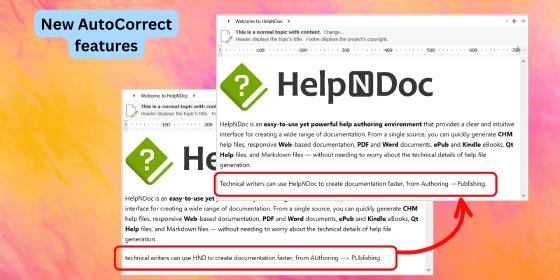
- New optional automatic capitalization of the first word in each sentence while typing
- Added correction of accidental double capitals at the beginning of words, with configurable exceptions
- Introduced customizable text shortcuts for symbols, emoticons, arrows, and common corrections
- Added an option to configure the number of heading levels displayed in the default HTML template's inline table of contents
- Hold the CTRL key while copying topic content as Markdown to exclude inline Base64 images, improving compatibility with AI systems
- Improved PDF generation performance, reliability, and compatibility across a wider range of PDF viewers
- Improved the generated PDF code used for embedding and managing build assets attached to PDF documents
- Enhanced text rendering, graphics drawing, and font embedding for higher-quality PDF document generation
- Improved the default HTML template's index popup to display the full topic hierarchy, making it easier to distinguish between topics with similar names
- Fixed an issue where the selected accent color was not applied consistently to all elements in the default HTML template, including some tabs and buttons
- Fixed an issue where some elements in the default HTML template remained light-colored when using a dark theme
- Improved the default HTML template's inline table of contents to be more compact, integrate better with other UI elements, and handle skipped or invalid heading hierarchies more gracefully
- Fixed an issue in the template editor that allowed the root "assets" folder to be deleted, preventing new assets from being created or imported into the template
- Improved the list editor for topic HTML aliases and template HTML tags, adding support for filtering, sorting, and inline item editing
- Reworked several icons to improve visibility, particularly when the application is used in dark mode
- Improve the built-in code editor with enhanced bracket highlighting and code selection
- Fixed an issue where the dynamic content editor did not support the Tab key for adjusting code indentation